Fable Shames Dev
For a while now, I've been noticing a problem with my Neovim configuration that was annoying, but not annoying enough that I felt like doing something about it... until yesterday, when it finally crossed that threshold.
For my config, I have my
EasyMotion
clone bound to <leader><leader>[letter]. For example, if I type
<space><space>a, it will highlight every word boundary that starts with the
letter a in every window that is currently visible. By highlight, I mean that
it dims every other character, and every word that started with a has a bold
letter where the a used to be. This letter is random:
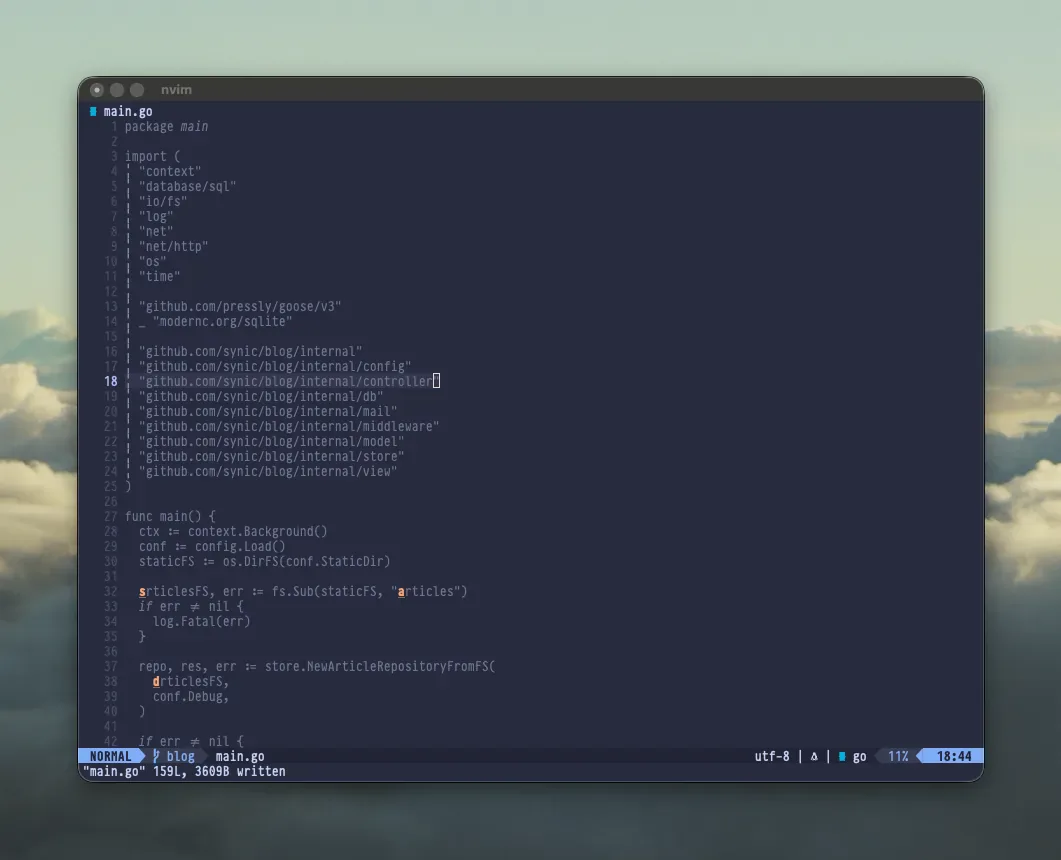
As you can see, the a at the beginning of articlesFS is still a, but it is
bold. The a in articles on the same line is a bold s. And the a in the
second articlesFS is a d. These are target characters. If I type d at this
point, my cursor will jump to the second articlesFS. This makes it super easy
to move around to any spot I want to that is currently visible on the screen.
The Problem 
I noticed that after using the
Snacks Picker
for almost any operation, if the very next thing I did was type <space><space>
to jump to a location, it would just repeat whatever the picker did.
So, if I opened a file in a split window with the picker, and I typed
<space><space>, it would just open that same file in another split window,
before I was even able to type the final target character. If I used gd to go
to definition (which is bound to use the snacks picker so that it's easy to
choose from multiple locations if there happens to be more than one), then
typing <space><space> would just go to that definition again.
If I moved the cursor one character in any direction, the easymotion functionality would be restored. So it ONLY happened (that I noticed) after using the picker, but before doing anything else.
The Solution 
I looked for the problem for quite a while. I looked through the Snacks Picker, source code, I looked through the which-key.nvim code. I looked for keybindings that persisted only after picking something in the picker. I added debug logging to the EasyMotion functions in my config, which only showed that they were never called at all when this problem was happening.
After a while of scouring and finding nothing, I finally sicced Fable on it, and after ~10 minutes of it monkeying around, presumably looking at all the same things I looked at, it came back with the answer:
The repeat isn't a Neovim or plugin bug, so there's no config change
to make. macOS's "Add period with double-space" setting turns your
second space into . plus a space in iTerm. Neovim receives <leader>.,
which is your "Resume last search" mapping (keymap.lua:325), and that
re-runs the last picker. Your own session log shows it: typed=<Space>.
arrived before the second <Space>, and HopOverwinF was never called.

All the debug logging is removed. plugin/hop.lua and
lua/modules/lsp.lua are back to their committed state, which also
drops the earlier debug lines in hop.lua. Your other uncommitted
changes are untouched. You can delete the leftover /tmp/hop_debug.log.

To fix it, turn the macOS substitution off. I haven't run either of
these because they change system settings outside this repo:

- iTerm only (recommended): this keeps double-space-period in your
  other apps. Restart iTerm afterwards.
  ! defaults write com.googlecode.iterm2 NSAutomaticPeriodSubstitutionEnabled -bool false
- System-wide: System Settings → Keyboard → Text Input → Edit… → turn
  off "Add period with double-space".

I couldn't test the fix myself: my test keys went in through tmux,
which bypasses macOS text input, which is also why I never saw the
bug. After restarting iTerm, open any picker, confirm, and press
<space><space> plus a letter without moving the cursor. Hop hints
should appear.

If you'd rather leave the macOS setting alone, moving "Resume last
search" off <leader>. would stop the picker reopening. It would not
fix hop, though: Neovim would still receive <Space>. rather than two
spaces.
TL;DR 
It was not a Neovim configuration problem. It was macOS automatic punctuation
replacement. For whatever reason, after using the picker (or maybe it was some
other sequence), macOS punctuation replacement was automatically changing
<space><space> to <space>., and <space>. in my config is "repeat last
picker action".
Why I haven't seen this problem before, I have absolutely no idea.
At least it's "fixed" now.